Website Audit Checklist for Small Businesses: What to Fix Before You Redesign

If your website feels outdated, difficult to manage or no longer quite right for your business, a redesign can seem like the obvious next step.
But before you rebuild everything, it helps to understand what is actually wrong.
This practical website audit checklist for small businesses is designed for service-based professionals who want to separate structural problems from focused fixes and decide more clearly what deserves attention next.
There is a particular kind of frustration that happens when you know your website is not working as well as it should, but you cannot quite explain why.
Perhaps:
You hesitate before sending someone to a particular page because the wording no longer reflects what you do.
A simple update turns into a much bigger job because changing one thing exposes three others that also need attention.
Enquiries still come through, but the process behind them feels more manual and awkward than it should.
Somewhere between when you started your business, built your website and the business you run now, things have started to move in a different direction.
That is often when a redesign starts to feel appealing. Sometimes a redesign is exactly what you need.
“A redesign is a solution. And it should come after a diagnosis.”
Why it is so difficult to know whether your website really needs a redesign
As your business evolved over time, you added things to your website:
A service changed, so you updated a paragraph.
You introduced a new offer, so you added another page.
You started using a booking tool.
Then an email platform.
Then a lead magnet.
Perhaps your prices change.
Maybe the people you most want to work with change.
Each decision may make complete sense at the time. But over several years, the website can begin to reflect different versions of the business all at once.
This is especially common in service-based businesses because the business itself is rarely static: your thinking develops, your expertise becomes more specialised, the way clients work with you changes, and the website has to keep up.
And often many service-based business owners (myself included) lean towards these solutions: redesign the homepage, change platforms, add automations, do more SEO, publish more content.
All of those things can be useful. But only if they are addressing the right problem.
So something that appears to be a website problem may really be a positioning problem, a systems problem, a content problem or simply a maintenance problem.
That is why a useful small business website audit should look beyond design.
Start with the business before you assess the website
Before you look at fonts, colours or layouts, ask a few basic questions:
Has the business changed?
Are you offering the same services you offered when the website was built?
Are you serving the same type of client?
Has your business model changed?
Are you now selling courses, workshops, retainers or digital products that did not exist before?
Has the way you prefer to work with clients changed?
Do you now expect your website to do something it was never designed to do?
Sometimes the website itself is supporting an older version of the business.
That is where website strategy becomes more important than cosmetic improvement.
You also need to be clear about the job the website is supposed to do now. For one business, that might be generating qualified enquiries. For another, it may be helping potential clients understand a complex service before they make contact.
Another site may need to support bookings, sell a course, grow an email list or attract people through search.
Until that role is clear, it is hard to judge whether the website is succeeding.
Website audit checklist for small business: 7 areas to review
Start with the parts of your website that affect clarity, client experience, and how the business actually operates.
1. Positioning and clarity
Start with the simple questions:
Can a new visitor understand what you do?
Can they tell who you help, what you offer and what they should do next?
Do they reflect the services you offer today?
Is the language still accurate?
Are old offers still visible?
Has the business become more specialised while the website still sounds broad?
If the underlying structure works but the message has become unclear, you may not need a redesign, but perhaps better positioning or copy.
2. Navigation and page structure
Now look at how people move through the site.
Does your navigation still make sense?
Are important pages easy to find?
Have pages been added over time without reconsidering how they fit into the overall structure?
Has the menu become crowded?
Are there old pages that no longer serve a useful purpose?
A few navigation improvements do not automatically justify a complete rebuild.
But if the structure no longer reflects the business or how clients need to move through the site, that may indicate a more fundamental issue.
3. Client journey and calls to action
Choose one important journey and follow it from beginning to end.
For example:
Homepage → service page → enquiry form → confirmation
Or:
Blog post → lead magnet → email → next step
Now look at what happens at each stage.
Is the next action obvious?
Does the call to action make sense for someone at that point in the decision-making process?
Does the enquiry form ask for the right information?
What happens after it is submitted?
You can do the same exercise with a booking journey, a lead magnet or a course.
The point is to see whether the journey makes sense as a whole. This is where the ideas in Your Website Is Live — But Can You Actually Use It? become particularly relevant.
A website can be technically functional while still creating unnecessary admin or uncertainty behind the scenes.
4. Forms, bookings, email and connected systems
This is where a website checklist for your service business needs to go beyond what is visible on the page.
→ Test your contact forms.
→ Check where notifications are sent.
→ Go through your own booking process.
→ Request your own lead magnet.
→ Check the emails someone receives afterwards.
→ Review payment links where relevant.
A polished website can still create a poor experience if the systems behind it are disconnected.
Examples: A form may work but send information to an inbox nobody checks. A booking system may accept an appointment but send an outdated confirmation. A lead magnet may collect an email address without delivering what was promised.
Each problem may be small. Together, they can create extra work for you and unnecessary friction for the client.
If you would like to review these foundations yourself first, the free Digital Foundations Checklist gives you a structured 16-point review of your website and connected digital setup.
5. Mobile experience and basic performance
Most business owners spend considerably more time viewing their own website on a desktop than many of their clients do.
So check your important pages on a phone:
Is the text comfortable to read?
Are buttons easy to use?
Do images load reasonably quickly?
Can someone complete a form without fighting the layout?
Does anything overlap, disappear or become difficult to navigate?
One awkward page on mobile does not mean the whole website needs rebuilding.
It means that particular problem deserves attention.
6. Search visibility and content
If your website isn't attracting enough visitors, it can be tempting to conclude the whole site is underperforming.
Review your key pages and ask whether they have a clear search purpose.
Do they use the language your clients actually use?
Are older pages still accurate?
Are useful blog posts linked to relevant service pages?
Is valuable content buried where very few people will find it?
Do you have evidence from Google Search Console or your analytics that can help you understand what people are already finding you for?
A redesign does not automatically solve discoverability. If search visibility is part of the problem, SEO Basics for Service-Based Businesses is a useful place to work through the fundamentals first.
7. Ownership and maintainability
Finally, consider how manageable the website is from your side.
Can you make routine updates when you need to?
Do you know where the important settings and systems live?
Do you have access to the tools you pay for?
Is there documentation?
Does every minor change require someone else?
Is the website more complicated than the business actually needs?
Ownership means you understand the setup well enough to make informed decisions and know when support is appropriate (it doesn't mean you have to do it all yourself).
If basic maintenance has become difficult or you no longer understand how the pieces fit together, that deserves attention too.

Want to review the foundations yourself first?
The free Digital Foundations Checklist gives you a structured 16-point review of your website, forms, bookings, email, SEO basics and connected systems.
Use it to identify what is working, what needs attention and which three areas are worth prioritising first.
The most useful audit question: What kind of problem is this?
Once you have worked through those seven areas, resist the urge to immediately create one long list of everything that could be improved.
First ask:
→ What kind of problem have I actually found?
An outdated service page may need better copy.
A broken form may need a technical fix.
A confusing client journey may need strategic work.
An SEO backlog may need ongoing optimisation.
A site that no longer reflects the business model may need restructuring.
And a website whose underlying architecture genuinely cannot support what the business now needs may, in fact, need rebuilding.
Here is a useful way to think about it:
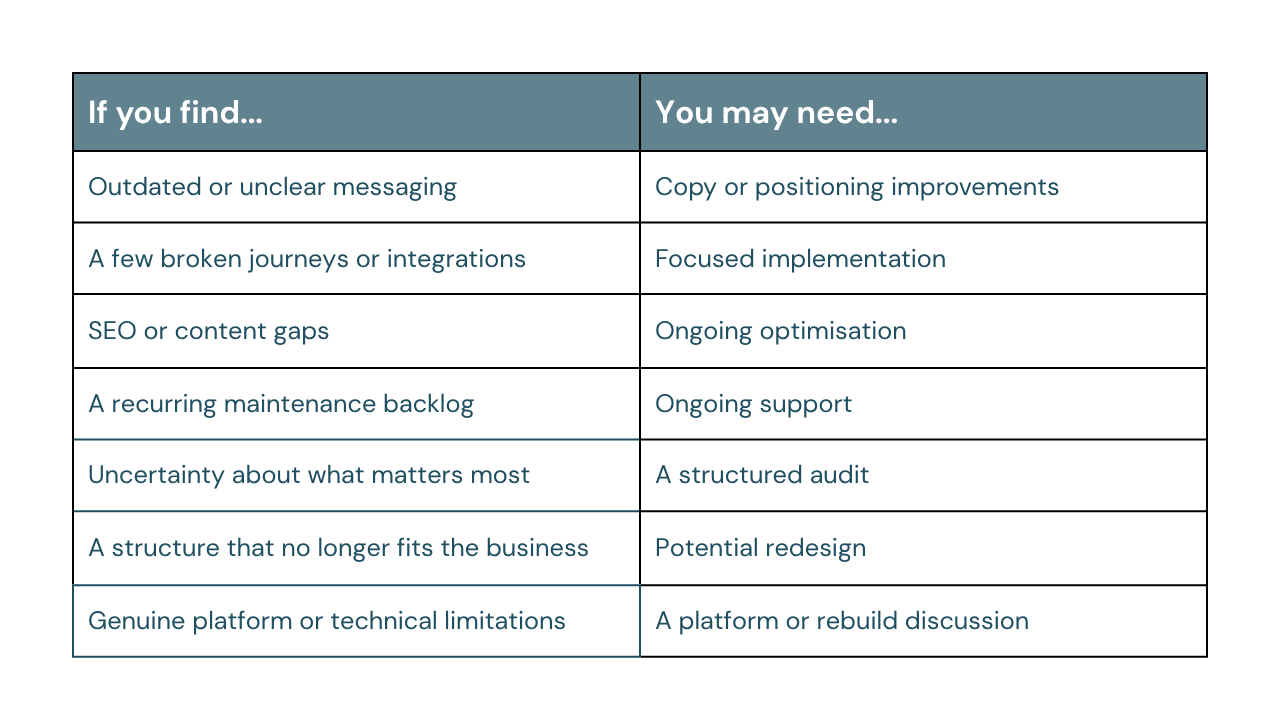
This distinction matters because not every problem requires the same level of intervention.
A small business website audit is useful precisely because it helps you separate those issues. Without that step, it is easy to treat every problem as equally urgent (or expensive).
So when does a website redesign for small business actually make sense?
Sometimes a website redesign is the sensible next step, especially when:
The structure no longer supports the business.
Your services have changed significantly.
Your audience is different.
The way clients buy from you has changed so much that the current site architecture no longer makes sense. Continuously adjusting the old structure may eventually become less efficient than rebuilding it around the business as it exists now.
A redesign may also make sense when the platform or underlying build genuinely prevents necessary improvements. That does not mean changing platforms because another one offers more features. Almost every platform has features you are not using.
Your current setup materially prevents you from doing something the business actually needs.
Repairing a poor foundation stops making commercial sense.
If every improvement exposes another structural issue and the cost of working around the existing setup keeps growing, starting again may be cleaner.
But the conclusion should come from what you have discovered.
Redesign should result from the assessment, not the assumption you begin with.
Common question: Isn’t it easier just to start again?
Sometimes, yes.
Sometimes, starting again is faster and more sensible than preserving a setup that no longer works.
But if the real issue is unclear positioning, you can reproduce that on a beautiful new website.
If the client journey is confusing, changing templates will not fix it. If too many tools have been added without a clear system, moving everything to another platform may simply relocate the complexity. And if you do not yet know what the website is meant to do, a redesign gives you more design decisions to make without necessarily giving you more clarity.
A rebuild works best when you already understand:
what is currently failing;
what is still working;
what needs to change; and
what the website needs to support next.
Starting again is not the same as solving the underlying problem.
What becomes possible when you know what actually needs fixing
The most useful result of an audit is clearer priorities.
You may discover that three specific things are creating most of the friction. Perhaps:
The positioning needs updating.
The enquiry journey needs simplifying.
The site is fundamentally sound but a few forms and systems need reconnecting.
In that case, a Website & Systems Implementation project may be more appropriate than a rebuild. Or you may confirm that the structure genuinely no longer supports the business and that a redesign is justified.
Either way, you can make the next decision with more confidence.
You also stop treating every issue as equally urgent.
You are less likely to buy another tool simply because it promises to solve a problem.
You can brief a designer, developer or copywriter more effectively.
You know which tasks you can deal with yourself and which ones are worth handing over.
Future investment becomes more deliberate.
This shift from “something feels wrong” to “these are the three things that need attention first” is so important, and that is much easier to work with.
A simple way to decide what to do next
Start by defining the role your website needs to play in the business now.
Then review the seven areas:
Positioning and clarity
Navigation and structure
Client journey and calls to action
Forms, bookings, email and connected systems
Mobile experience and performance
Search visibility and content
Ownership and maintainability
Once you have identified the gaps, resist the temptation to fix everything at once. Choose the issues that have the greatest effect on:
clarity;
enquiries;
client experience;
visibility;
unnecessary admin; or
your ability to manage the website sensibly.
Then ask what type of solution each issue actually requires.
It could be routine maintenance, implementation, or strategic thinking.
Some may be better handled through Ongoing Website & Systems Support.
Some may genuinely point toward a redesign.
The aim is to choose the smallest sensible next step that addresses the real problem.
Your website does not need to be perfect to be useful
If your website feels outdated, frustrating or difficult to manage, it does not automatically mean everything needs to go.
A website audit helps you separate what is structural from what is simply overdue for attention.
You may discover that the site does need rebuilding. You may also discover that the foundation is sound and a few focused improvements would make a substantial difference.
Both outcomes are valuable.
Because once you understand the problem, you can stop reacting to the website as one large, vague source of frustration and start making deliberate decisions about what to address next.
Explore Website & Systems Clarity Audit
If you know your website or digital setup needs attention but you are not sure what the real problem is, the Website & Systems Clarity Audit is designed for that stage.
I review your website, client journey and relevant connected systems in the context of how your business actually works. The aim is to identify what is already working, what genuinely deserves attention, what should come first and what may not need changing at all.
You receive a written report and prioritised roadmap so you can make clearer decisions about what to address yourself, what to implement with support and whether a larger redesign is actually justified.